
First Time Here?
If you received an email invitation, you're in the right place! This guide will walk you through the registration process step by step.
Step 1
Accept Your Invitation
You'll receive an email invitation to join Shepherd Staff. Click the link in the email to get started.
- Check your email inbox for an invitation from Shepherd Staff
- Click the 'Access the Portal' button in the email
- You'll be redirected to the login page
Step 2
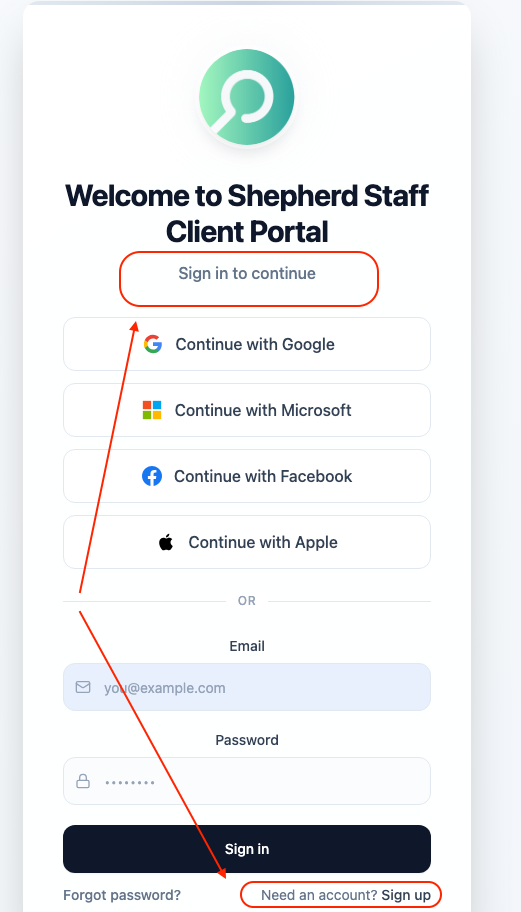
Log In or Sign Up
If this is your first time, you'll need to create your account. If you already have an account, simply log in.
- Enter your email address (the one that received the invitation)
- If you're new, click 'Sign Up' to create your account
- If you have an account, click 'Login' and enter your credentials
Step 3
Verify Your Email
For security, you'll need to verify your email address with a one-time code.
- Check your email for a verification code
- Enter the 6-digit code on the verification screen
- Click 'Verify' to confirm your email address
Step 4
Welcome to Shepherd Staff!
You're all set! You now have full access to your assigned job search.
- Track candidate progress through each module
- Review candidate profiles and evaluations
- Collaborate with team members on candidate feedback
Need Help?
If you're having trouble with the registration process, please contact the administrator who invited you. They can resend your invitation or help troubleshoot any issues.
Registration Approval
A note on your account status after initial setup.
- To ensure security, new accounts for Hiring Authorities require a brief verification by our administrative team.
- Once you've registered with your invitation link, your account will be pending until an administrator approves your access.
- You will receive an email notification as soon as your access to the portal has been confirmed.
All invitation emails are sent from a verified Shepherd Staff email address